Where Your Data Lives
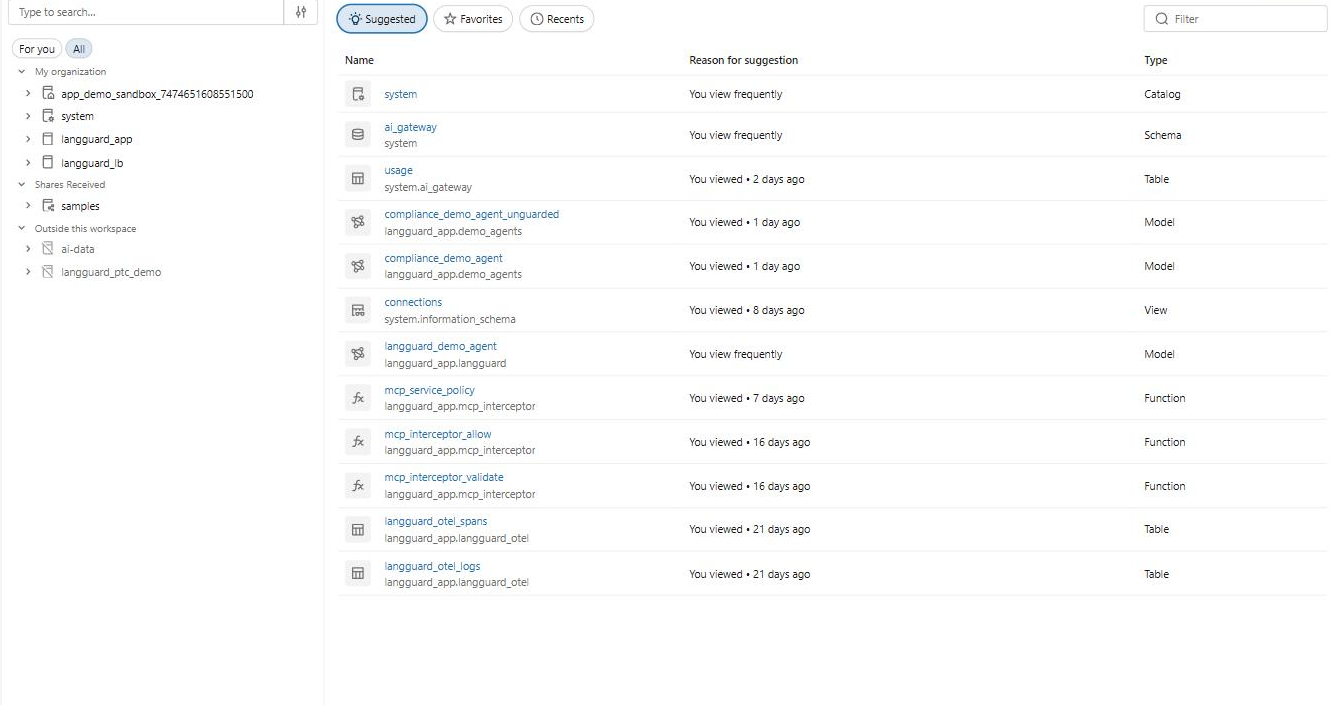
Everything the Databricks App stores stays inside your Databricks account, split across two governed stores:
- Unity Catalog (Delta) — trace and observation data (the high-volume, query-anywhere telemetry)
- Lakebase PostgreSQL — application metadata (policies, entities, config, secrets-backed settings)
Both are provisioned automatically during installation.
Unity Catalog (Delta)
LangGuard creates a catalog — langguard_app by default (the name is stored in the
databricks-catalog secret) — with two schemas:
| Schema | Holds |
|---|---|
langguard_otel | Raw OTEL ingestion tables (external storage) |
langguard | Views over the raw data + annotations and discovery state |
Tables
| Object | Schema | Type | Contents |
|---|---|---|---|
langguard_otel_spans | langguard_otel | Delta table | Raw OTEL spans (the native OTLP ingestion target) |
langguard_otel_logs | langguard_otel | Delta table | Raw OTEL logs |
trace_annotations | langguard | Delta table | User tags/notes, policy results, entity mappings (merged into trace views) |
discovery_status | langguard | Delta table | OpenCITE discovery high-water marks |
Views (the read path)
The app reads traces through views that map the raw OTEL spans into LangGuard's schema:
| View | Maps |
|---|---|
langguard_traces | The combined read path — UNIONs the two views below |
langguard_traces_otel | Root spans → trace schema (with cost computed inline) |
langguard_inference_traces | AI Gateway inference (*_payload) tables, regenerated at runtime |
langguard_observations | Child spans → observations |
langguard_trace_stats | Pre-aggregated hourly stats for dashboards |
The langguard_otel schema must be backed by customer-managed external storage
(S3 / ADLS / GCS), and the ingestion tables carry
TBLPROPERTIES ('otel.schemaVersion' = 'v1'). Databricks' native OTLP endpoint
rejects metastore-managed storage. The installer enforces this when it sets up the
schema.
Lakebase PostgreSQL
Application metadata lives in a Databricks Lakebase PostgreSQL database, under
a schema named catalog:
Table (in catalog schema) | Contents |
|---|---|
users, user_tenants, tenants | Identities and the single tenant |
integration_connections | Connected integrations |
policies, policy_violations, policy_stats | Governance policies and results |
entities, entity_usage_stats, entity_lineage | Discovered AI assets and lineage |
api_keys | Hashed API keys |
arbiter_guarded_endpoints | Guarded Endpoint wrapper configs |
endpoint_enforcement_settings | Per-endpoint enforce/observe toggle |
model_pricing | Per-model token pricing (drives cost computation) |
app_config, session | Internal config (poller checkpoints) and web sessions |
How cost is computed
Trace cost isn't stored — it's computed on read. The langguard_traces view
LEFT JOINs the Lakebase model_pricing table (registered into Unity Catalog as a
federated catalog — langguard_lb — via databricks postgres create-catalog) and
applies per-million-token input/output pricing. Update pricing in LangGuard's
Cost Estimates settings and every trace's cost reflects
it immediately.
Data residency
Nothing leaves your workspace. Traces are ingested into your Unity Catalog tables on your external storage, metadata lives in your Lakebase database, and the app runs on your Databricks compute. You can apply your own Unity Catalog grants, lineage, and auditing to every LangGuard table.
Next steps
- Data Capture — how these tables get populated
- Trace Explorer — query the trace views from the UI
- Cost Estimates — manage model pricing