AI Gateway Enforcement
When running as a Databricks App, LangGuard can sit inline in front of your Mosaic AI Gateway and Model Serving endpoints and enforce policies on every model call in real time — allowing, flagging, or blocking requests before they reach the Foundation Model.
How it works
LangGuard exposes an OpenAI-compatible /v1/chat/completions proxy inside the
app. You create a Guarded Endpoint — an AI Gateway external model serving
endpoint that forwards to that proxy — and point your applications at it instead
of the raw model endpoint.
   Your app / agent
        │  POST /serving-endpoints/<guarded>/invocations
        ▼
   Databricks AI Gateway  (external model endpoint)
        │  forwards with the shared proxy key
        ▼
   LangGuard /v1/chat/completions   ◀── Databricks Apps OIDC proxy
        │   1. validate model against the endpoint catalog
        │   2. PRE-call policy evaluation
        │   3. forward to the real Foundation Model (App service principal)
        │   4. POST-call policy evaluation
        │   5. emit an OTLP trace (allow / notify / block)
        ▼
   Databricks Foundation Model API
Every guarded call is evaluated twice — once before the model is invoked (pre-call) and once on the response (post-call) — so policies can reason about both the prompt and the completion, including any tool calls the agent made.
The enforcement decision
Each call resolves to one of three outcomes, recorded on the trace as
langguard.policy.status:
| Decision | Behaviour | Trace status |
|---|---|---|
| Allow | Request proceeds normally | success |
| Notify | Request proceeds, but a violation is recorded for review | success (with violations) |
| Block | Request is rejected before/after the model call; the caller receives an error | blocked |
Blocked traces are surfaced end-to-end in the Trace Explorer with a blocked status badge and the triggering violations.
Enforce vs. permissive per endpoint
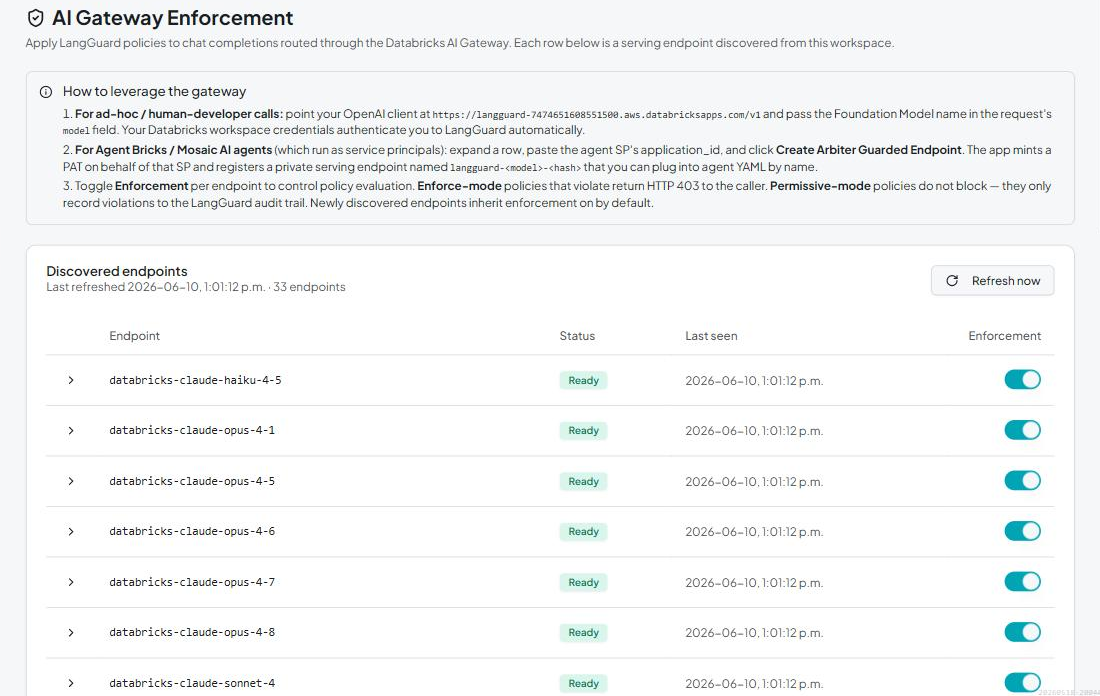
Enforcement is controlled per endpoint with a toggle:
- Enforce mode — a policy violation blocks the call and the caller receives an HTTP 403.
- Permissive mode — violations are recorded to the audit trail, but the call proceeds (observe-only).
Newly discovered endpoints inherit enforcement on by default. Onboard an endpoint in permissive mode, confirm the policy results look right, then leave enforcement on.
Identity and authentication
- Caller identity — requests arrive through the Databricks Apps OIDC proxy,
which authenticates the user and passes their email as
x-forwarded-email. LangGuard records this as the trace's end-user identity, so every model call is attributed to a real principal. - Downstream calls — LangGuard calls the Foundation Model API using the app's
service principal credential. Foundation Models require the
all-apisscope, which on-behalf-of (OBO) user tokens cannot grant, so the app SP is used for the downstream hop while the caller's identity is preserved in the audit trace. - Shared proxy key — the
proxy-shared-keysecret is the bearer token the AI Gateway external-model endpoint presents to the Apps proxy, so only your AI Gateway endpoint can reach the LangGuard proxy.
What gets recorded
Each guarded call emits an OTLP trace (see Data Capture) carrying GenAI semantic-convention attributes plus LangGuard extensions:
langguard.policy.status—allow/notify/blocklangguard.policy.violation_countand the violation detailslangguard.gateway.enforcement_enabled— whether the endpoint was in enforce mode- token usage and computed cost, model, provider, and the caller's identity
Streaming responses are supported. Per-chunk streaming policy evaluation is applied through LangGuard's streaming evaluator; non-streaming calls get full pre- and post-call evaluation.
Setting it up
Open Settings → AI Gateway Enforcement in the app. Every serving endpoint discovered in your workspace is listed with a per-endpoint enforcement toggle. There are two ways to route calls through LangGuard:
- Ad-hoc / human-developer calls — point an OpenAI-compatible client at the
app's
/v1endpoint and pass the Foundation Model name in the request'smodelfield. Your Databricks workspace credentials authenticate you to LangGuard automatically. - Agent Bricks / Mosaic AI agents (which run as service principals) — expand
the endpoint row, paste the agent service principal's
application_id, and click Create Arbiter Guarded Endpoint. LangGuard mints a PAT on behalf of that service principal and registers a private serving endpoint namedlangguard-<model>-<hash>that you plug into your agent YAML by name.
Review results in the Trace Explorer and Policy Violations, and use permissive mode while you tune before enforcing.
Next steps
- Data Capture — how guarded calls become traces
- Creating Policies — author the rules that enforce
- Unity Catalog Data — where guarded-endpoint config lives